Routes & GPX
Running routes made for today’s workout.
RunWay suggests three loops from where you are, picked for the session you’re about to run. Choose one, and your coach guides you turn by turn, in your ears.

Free on the App Store · iPhone
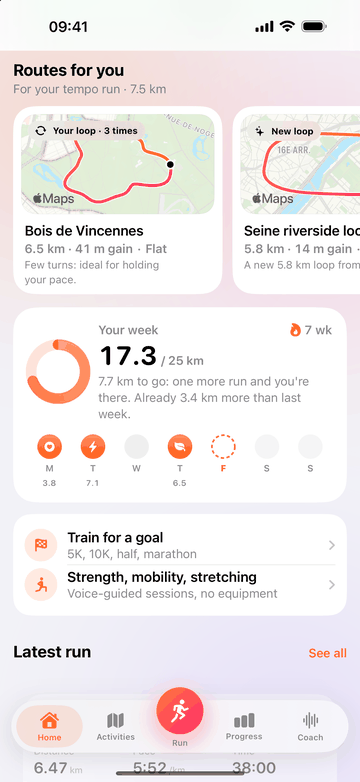
Three routes, picked for the session.
A tempo run wants a flat loop with few turns. An easy run is nicer in a park. A long run needs a big loop, and hill work needs hills. RunWay knows today’s workout, checks the weather, and suggests three routes to match, right on the home screen.
- Your usual loops. Recognized from your run history, with how many times you’ve run them and your best time.
- New loops from where you are. Built with Apple Maps walking directions, so they follow paths and streets you can actually run.
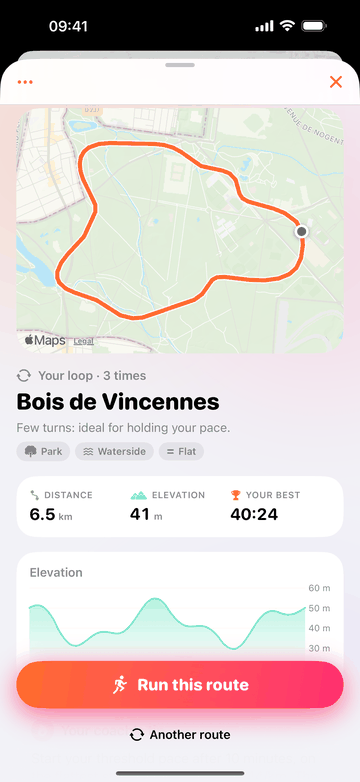
- The details that matter. Distance, elevation gain and profile for each route, and a short tip from your coach.
- Not the one? Ask for another route.
Turn by turn, in your ears.
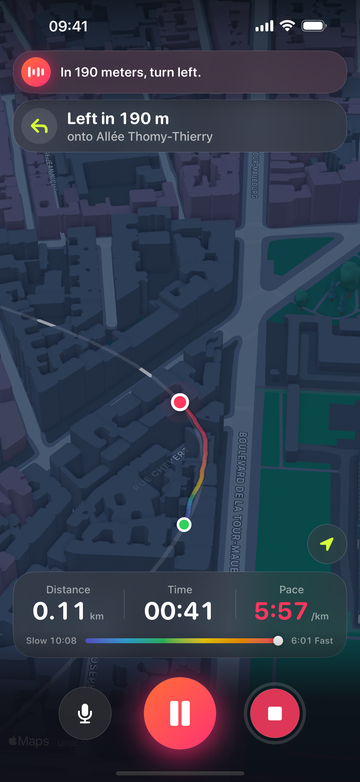
Tap “Run this route” and the loop appears on your live map. Your coach calls out each turn before you reach it, tells you if you leave the route, and counts your laps. Your phone can stay in your pocket.
- Turns ahead of time. “In 190 meters, turn left.”
- Off-route alert. A cue when you stray, and another when you’re back on the route.
- Laps on loops. Run it twice and your coach keeps count.
- Directions you can trust. Turn cues come from the route itself, through fixed rules in the app, never invented by the AI.
Back on a loop you know? Race yourself.
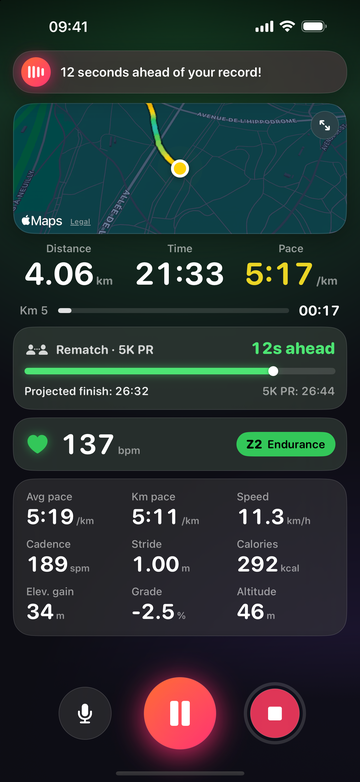
The loops you run often are the best place to see progress. Pick Rematch on the start screen and race your last run or your record. Your coach tells you the live gap, so you know exactly when to push.
- A gap you can hear. “12 seconds ahead of your record!”
- A projected finish. Compared with the time to beat, kilometer after kilometer.
GPX in, GPX out.
Send a route to your watch, or bring your race course into RunWay and let your coach guide you on it.
Export to your watch
A GPX file with the track, laps, altitude and turn cues as waypoints, ready for Garmin, COROS, Suunto and more.
From a past run too
Loved a loop? Export its route from the run’s detail.
Import a race course
Open the course GPX from the Files app and follow it with voice guidance.
Private by design
Route requests to Apple Maps carry neither your name nor your account.
FAQ
Is there an app that suggests running routes near me?
Yes. RunWay suggests three routes from where you are for today’s workout: your usual loops, recognized from your history, and new loops built with Apple Maps walking directions. Each one shows its distance, elevation gain and a tip from your coach.
Can I send a route to my Garmin, COROS or Suunto watch?
Yes. Export the route as a GPX file, with its track, laps, altitude and turn cues as waypoints, then open it in your watch’s app to load it on the watch. You can also export the route of a past run.
Can I follow my race course in RunWay?
Yes. Import the course GPX from the Files app and your coach guides you on it, turn by turn. Training for a trail? Our trail and ultra plans prepare you for the distance and the climbing.
Does the guidance work with the screen locked?
Yes. Turn cues, off-route alerts and laps come through your earbuds, and your numbers stay on the Lock Screen.
What location data does it use?
Your location builds the loops on your iPhone. Requests to Apple Maps for walking directions carry neither your name nor your account, and the elevation of a suggested loop comes from Open-Meteo, from a few dozen points along it. The details are in our privacy policy.

Your running coach, in your ears.
Download RunWay, put your earbuds in, and go.
Free on the App Store · iPhone · iOS 18 or later